On the product page
A “Find my size” button next to the size selector, at the exact moment your customer hesitates.

Solutions

The WeeFizz app adds “Find my size” to your product pages. Your customers answer a few questions, no photo needed, and see their size calculated in your own size chart, before adding to basket.
14-day trial on every plan · No commitment · Installed in minutes
It is an app that calculates each customer's size for each product, right on the product page, instead of leaving them to read a table of centimetres on their own.
A “Find my size” button next to the size selector, at the exact moment your customer hesitates.
Gender, height, weight, age and body shape chosen from images. Nothing to measure, nothing to photograph.
The size is calculated in each product's size chart, set up as it is and calibrated by WeeFizz.
Widget usage, recommended sizes and conversion, product by product, in your WeeFizz space.
Size chart apps on Shopify do not all do the same thing. There are three approaches, and they do not ask your customer the same question.
| Static size chart | Fit quiz | WeeFizz recommendation | |
|---|---|---|---|
| What the customer does | Measures themselves with a tape, then reads the table | Answers questions about their usual sizes | Answers a few questions they already know |
| What they get | Centimetres to interpret alone | An indication, based on the quiz rules | A size, calculated in the product's size chart |
| Between two sizes | “M or L?” remains unanswered | Depends on the questions asked | The size accounts for their body shape and the garment's ease |
| Per product | One table per product or collection | Often one shared rule | Each product's own size chart |
| What you learn | Nothing | Varies by app | Usage, recommended sizes, conversion, per product |
A size chart is still useful: it is the starting data. WeeFizz uses it to do the calculation for the customer. To see how a body shape becomes 14 measurements and then a size, read our expertise on body shape and ease.
A few minutes, with no developer. On Shopify, the app sets up your WeeFizz credentials by itself: there are no keys to copy.
Open the “WeeFizz Size Recommender” listing, click Install and choose your store.
Solo, Studio or Agency, each with a 14-day free trial. The subscription is billed by Shopify.
Import your charts or start from one of 8 ready-made templates, then adjust. Each size chart is set up as it is and calibrated by WeeFizz.
The “Find my size” button appears on your product pages. Colours, corner radius and button label are set from your space.
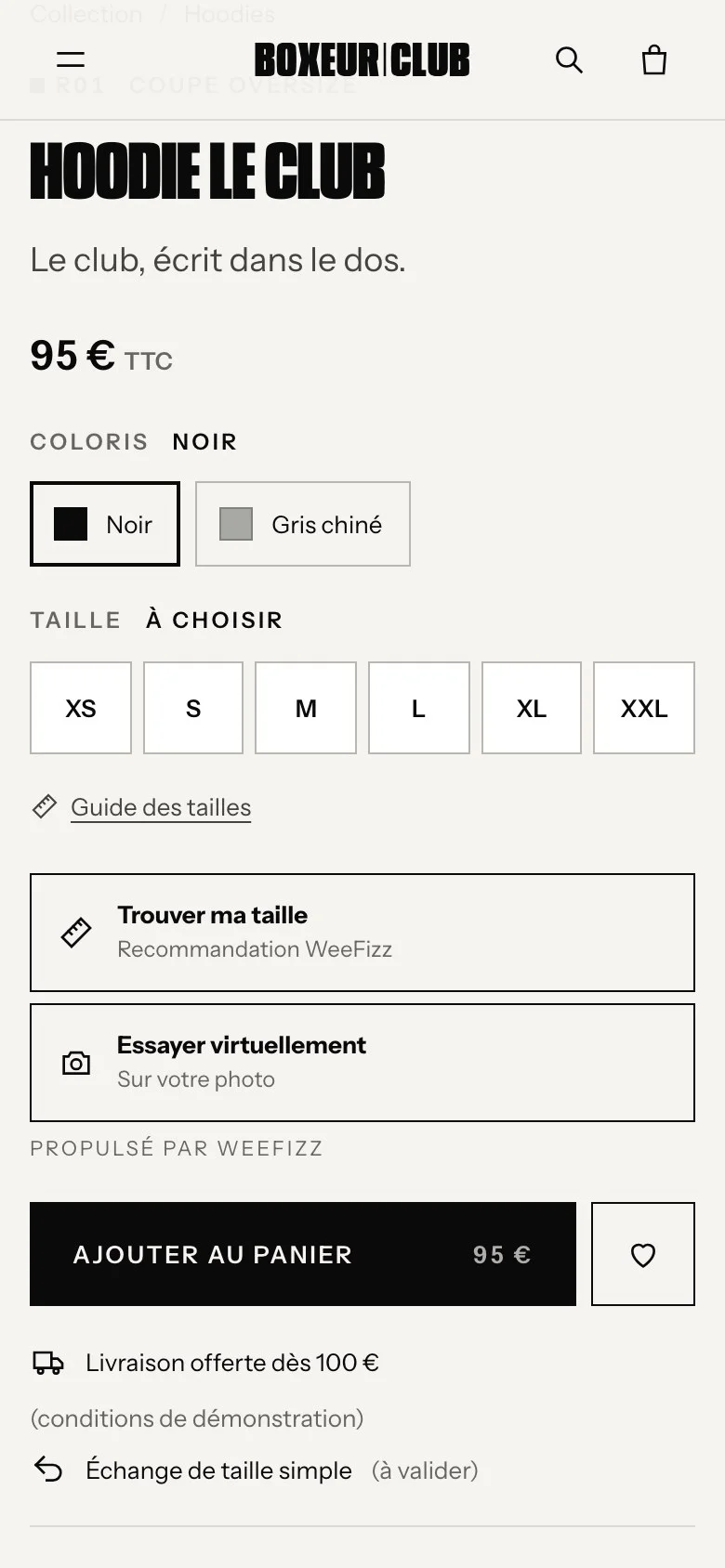
Your size chart is precise, but your customers do not know their measurements. They want an answer, not a table.
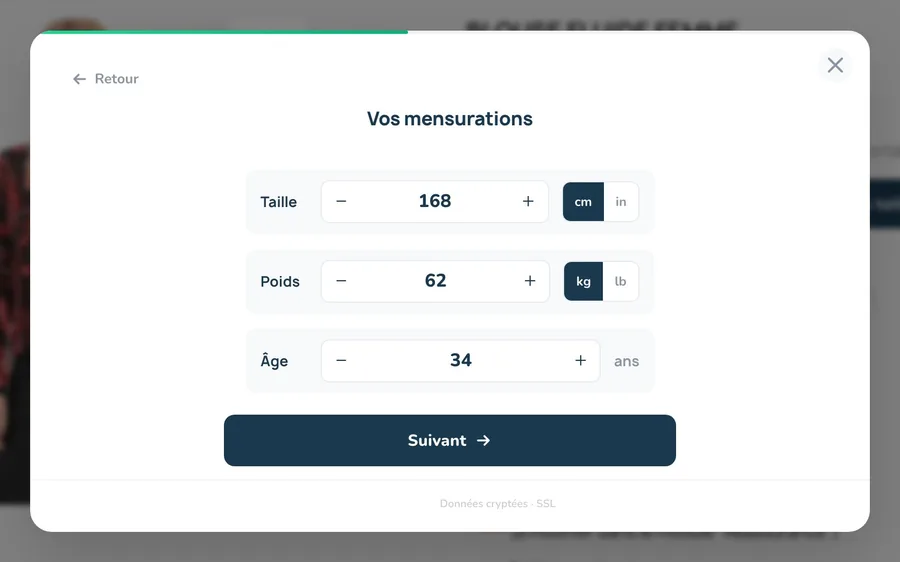
Gender, height, weight and age: data they already know, sent over an encrypted connection.
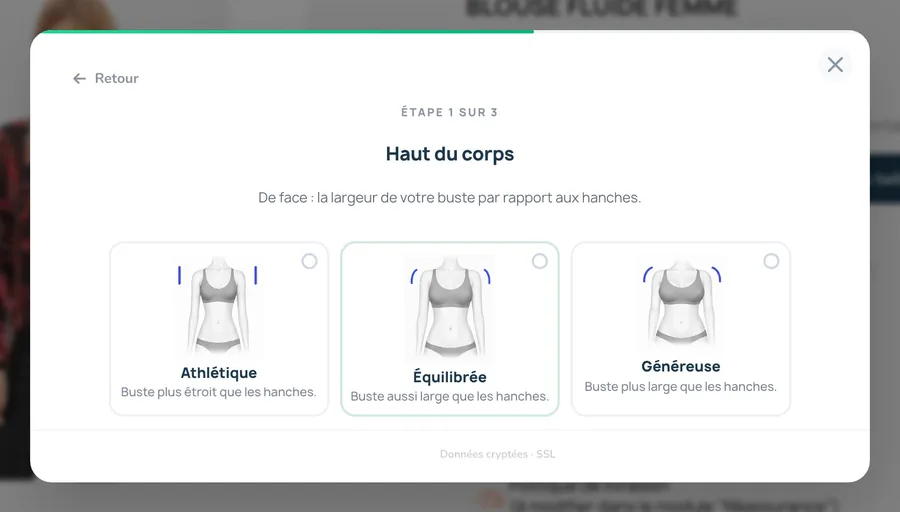
Upper body, stomach, hips: they pick the image that looks like them.
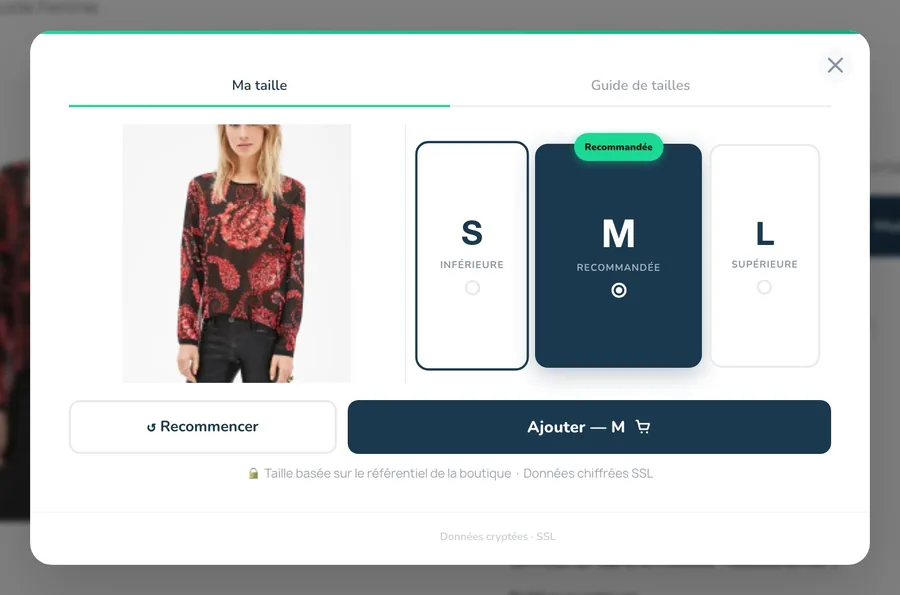
Calculated in the product's size chart, and remembered for the rest of the visit.

Screenshot of the WeeFizz space, Analytics section (demo store).
During the 14-day trial, you judge on your own figures, not on a promise. The analytics space is included in every plan.
Size-related returns weigh heavily on margins: we explain why in our insight on e-commerce returns.
Before installing a sizing app, ask these six questions. They apply to WeeFizz as much as to any other solution.
A table, however nice, leaves the customer to do the maths. A recommendation gives them an answer.
Check that the size is calculated in your own size chart, product by product, not in a generic chart.
A tape measure, a photo or a few answers: every extra step loses some customers along the way.
Without usage and conversion analytics, there is no way to know whether the app pays off.
Hosting, GDPR, consent for e-mails: ask for precise answers before installing.
A trial on your catalogue, with your figures, beats a generic demo. Then: is there a commitment or not?
Three plans, Solo, Studio and Agency, depending on your recommendation volume. Each one starts with a 14-day free trial. One subscription covers one store.
From the Shopify App Store, in a few minutes. Your size charts are set up as they are and calibrated by us.
Your WeeFizz space shows, product by product, widget usage, recommended sizes and conversion.
At the end of the 14 days, you keep WeeFizz or you stop. Billing goes through Shopify.
The widget is added through an app embed block, Shopify's standard mechanism: you switch it on in the theme editor, without changing your theme's code. The “Find my size” button then appears on your product pages. If your theme is heavily customised, book a 30-minute call and we will check the display on your own products.
A few minutes, with no developer. You install the app from the Shopify App Store, your WeeFizz credentials are set up automatically, you import your size charts or start from one of 8 ready-made templates, and the button appears on your product pages.
No. They enter their gender, height, weight and age, then choose their body shape from images. The WeeFizz engine derives 14 measurements and calculates the size in the product's size chart. No photo, no tape measure.
Only declared answers, with no photo and no biometric data. They travel over an encrypted connection (SSL) and are hosted in the European Union, in line with the GDPR. A customer's e-mail address is linked to their recommendation only if they are logged in and have given consent. Size charts, history and analytics belong to your store.
The widget displays in French, the language shown on the app's Shopify App Store listing. If your store sells in another language, write to us before installing.
Every plan (Solo, Studio, Agency) starts with a 14-day free trial. On Shopify, the subscription is billed by Shopify, on your Shopify invoice. At the end of the trial, you keep the plan that suits you or you stop, with no commitment.
You uninstall it from your store admin, like any Shopify app. The “Find my size” button disappears from your product pages and the subscription billed by Shopify stops. There is no commitment and no exit fee.
Another question? Write to the WeeFizz team, or discover the full WeeFizz Fashion offer for online stores, also available for PrestaShop, WooCommerce and through a JavaScript SDK.
Install the app from the Shopify App Store and test it for 14 days on your catalogue, with no commitment.