A lightweight plugin
The engine, size charts and analytics are hosted by WeeFizz. Your WordPress server has nothing to calculate.

Solutions

“M or L?”: the WeeFizz plugin answers instead of your size chart. On your variable products, the shopper opens “Find my size”, answers a few questions, sees the size calculated in your chart, then adds it to basket.
WordPress and WooCommerce · No commitment · No developer needed
WooCommerce size recommendation is a plugin that tells the shopper which size to order for a given product, instead of leaving them to read a table.
Size chart plugins for WooCommerce display your chart in a tab, a pop-up or a shortcode. The shopper then needs to know their measurements to the centimetre and choose between two sizes on their own. They hesitate, order both, or leave the page.
The WeeFizz plugin keeps your chart as the reference and does the reading for them. Three ways of handling size on a WordPress store:
| No tool | Size chart plugin | WeeFizz plugin | |
|---|---|---|---|
| The shopper sees | A list of sizes | A table in centimetres | Their recommended size |
| They have to | Guess | Measure and compare | Answer a few questions |
| Your size chart | Missing | Displayed | Integrated as it is and calibrated |
| Add to basket | Manual | Manual | In the recommended size |
| Analytics | None | None | Usage, recommendations, baskets |
The engine, size charts and analytics are hosted by WeeFizz. Your WordPress server has nothing to calculate.
Your full WeeFizz space opens inside the WordPress admin, and the Settings page holds your keys.
Your published products and their thumbnails appear in the WeeFizz space, with a button to synchronise again when you add products.
Label, colours, rounded corners, button or link, position: everything is changed from the Widget tab and applies on the next page load.
In the purchase form, close to your variations and the “Add to cart” button. You choose the exact position from your WeeFizz space.
The button appears on product pages whose product is linked to a size chart. It is placed using standard WooCommerce elements: a theme that keeps them needs no adaptation.
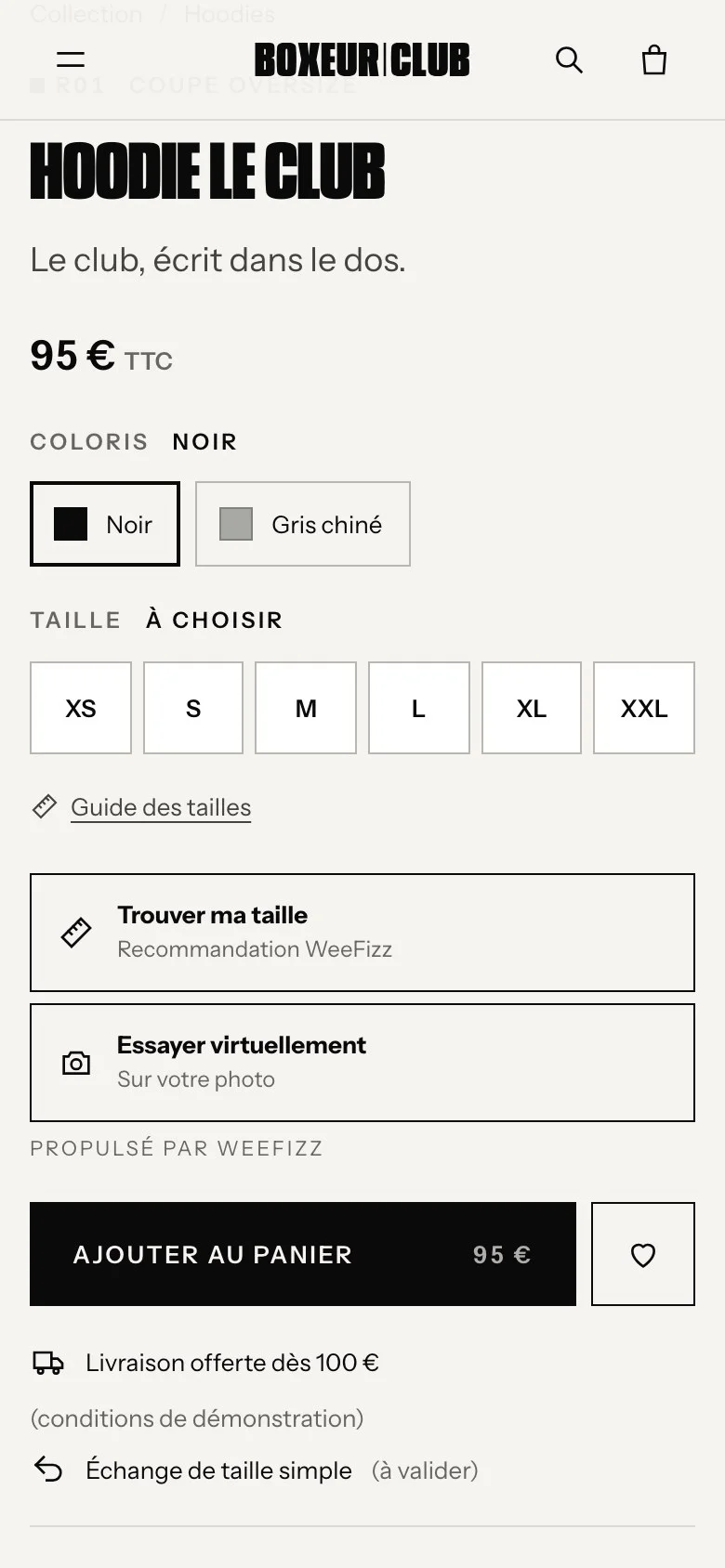
The plugin passes each variable product's variations to the widget. The recommended size is linked to the right variation, and the add to basket goes through WooCommerce.
The variation is added to the WooCommerce cart and the mini-cart updates, without reloading the page.
If the direct add does not go through, the widget selects the size in your variation list and uses your add-to-cart button.
The shopper's profile is remembered: on another product linked to the same size chart, their size appears without entering anything again. The duration can be set from 1 to 365 days, or switched off.
Tip for products sold in several colours and sizes: put the size attribute first, and give your sizes the same names as in your size chart (S, M, L or 38, 40, 42). The recommendation is then linked to the right variation without ambiguity.
The shopper gives the gender, then their height, weight and age.
They choose, from images, the shape of their upper body, stomach and hips.
The engine estimates 14 measurements and compares them with the product's size chart. The size appears alongside the neighbouring sizes.
No camera, no biometric data. The calculation is explained on our expertise page: the WeeFizz measurement engine.
Each size chart is integrated as it is, then calibrated by WeeFizz: the size is calculated in your brand's chart, never in a generic one. You import your charts, or start from one of 8 ready-made templates, then adjust.
In the Size charts tab, you link each WooCommerce product to its chart: T-shirts, trousers, jackets. The button only appears on linked products.
A few minutes, no developer, from the WordPress admin.
Choose WooCommerce on the sign-up page. Your keys and the plugin link arrive by e-mail.
Plugins · Add New · Upload Plugin, then Activate.
In the WeeFizz menu, Settings page, paste the public key and the private key, then click the licence check button.
Open your WeeFizz space and link your products to their size chart. “Find my size” appears on their product pages.
The Overview, Analytics and History tabs open inside WordPress. Over the 14 days, you judge on your own products, not on a promise.
Visits, openings and usage rate, product page by product page.
The share of shoppers who add to basket after their recommendation.
Recommended and chosen sizes, to adjust your restocking.
With the Studio plan, customer e-mails captured with their consent.
Why track these figures? Because every size that is right from the first order is one less return: see what size-related returns cost in e-commerce.
The plugin is included in the three WeeFizz Fashion plans, from €59 excl. VAT per month for 500 recommendations (Solo plan). 14-day free trial, no commitment, and one subscription per store. Compare plans.
The plugin requires at least WordPress 5.6, WooCommerce 5.0 and PHP 7.2. Your WordPress admin must be served over HTTPS for the WeeFizz space to open correctly.
It goes further. A size chart plugin displays a table; the WeeFizz plugin calculates the shopper's size in that same chart, integrated as it is and calibrated by WeeFizz. You can keep your table if you wish.
Yes, as long as your theme displays the standard WooCommerce product page: add-to-cart form, “Add to cart” button and variation selectors. Check the display during the trial, or book a 30-minute call to see it on your products.
Clear your page cache and your CDN after installation and after each plugin update, so that your product pages load the button.
No. The script is light and loads after your page. The calculation runs on WeeFizz servers, not on your WordPress hosting.
No. They enter their gender, height, weight and age, then choose their body shape from images. Their answers travel over an encrypted connection and are hosted in the European Union.
You carry on with the plan that suits you, or you stop. The trial has no commitment and the subscription can be cancelled at any time from your WeeFizz space.
On PrestaShop? See the PrestaShop size recommendation module. For the full offer, discover WeeFizz Fashion for online stores, or write to us.
Install the plugin, link your size charts: your analytics show the openings, recommended sizes and add-to-baskets every day. 14 days free, no commitment.